
The whole app is one readable file
Open it in any text editor and search for the words that send data — fetch, XMLHttpRequest, http. You will not find them. No other finance app can offer you that, because their code runs where you can't see it.
Track Yeah!
Everyone's information is already out there. Every app that helps you with money seems to want a copy of your bank feed first, held on somebody else's computer, under somebody else's terms.
We think that trade is unnecessary. Track Yeah! tracks a household's spending, budgets and tax deductions without any of it leaving the machine you're sitting at. There is no account to create, nothing to sign in to, and no server for us to keep it on — because there is no server.
That's the whole diagram. Not "we don't sell your data" — there is no path out of the box.
Free while in beta · Windows, macOS and Linux · No account
Anyone can write "your privacy matters" on a website. The difference here is that you don't have to take our word for it.
Open it in any text editor and search for the words that send data — fetch, XMLHttpRequest, http. You will not find them. No other finance app can offer you that, because their code runs where you can't see it.
The file carries an instruction your browser obeys whether we like it or not: no connections, to anywhere, ever. Even if we changed our minds, the page could not reach the internet without you noticing the change.
Set a PIN and everything is encrypted where it sits. The key is built from your PIN and a long random key that stays on that one computer, so a copied file or a stray backup can't be opened elsewhere at all.
It only ever looks at what you put in it. No bank connections, no open banking feed, no permissions to grant. You export a CSV from your bank the way you always could, and you decide what it sees.
Most of the year it's somewhere to put the household's spending. In July it turns into the thing that saves you an afternoon of scrolling through statements.
Drop in whatever your bank exports. Accounts are recognised from what's inside the file rather than its name, so downloading the same statement twice doesn't quietly create a second account and double everything.
An expense you typed and the same charge arriving on a statement are matched and netted. Money moved between your own accounts — including across different banks on the same day — is recognised as a transfer and taken out of both ends. Paying a loan from its offset stops looking like spending.
Drag "Gasoline" onto "Fuel" and they become one, budgets added together, and the merchant rules rewritten so the next import doesn't split them again. Rename while you're merging.
Caps are prefilled from what you actually spent, indexed for inflation. Part-way through a month it tells you how much of the month has passed as well as how much you've spent — so an early month doesn't look healthy and a late one doesn't look like a disaster.
Per-expense payer and split, with a settle-up that shows where you stand. Where a split has been assumed rather than recorded, it says so, instead of presenting a guess as a fact.
Fourteen deduction categories you can attach to a row or to a merchant. Work-from-home hours with both ATO methods tracked side by side. Rows you haven't classified are reported as unclassified — never quietly filed as personal.
Import your broker's trade history and it works out every parcel you hold, what each cost, and how long you've held it — carrying acquisition dates correctly through share splits and ticker changes. Estimated capital gains by parcel, with the working shown, and a check against what your broker says you hold.
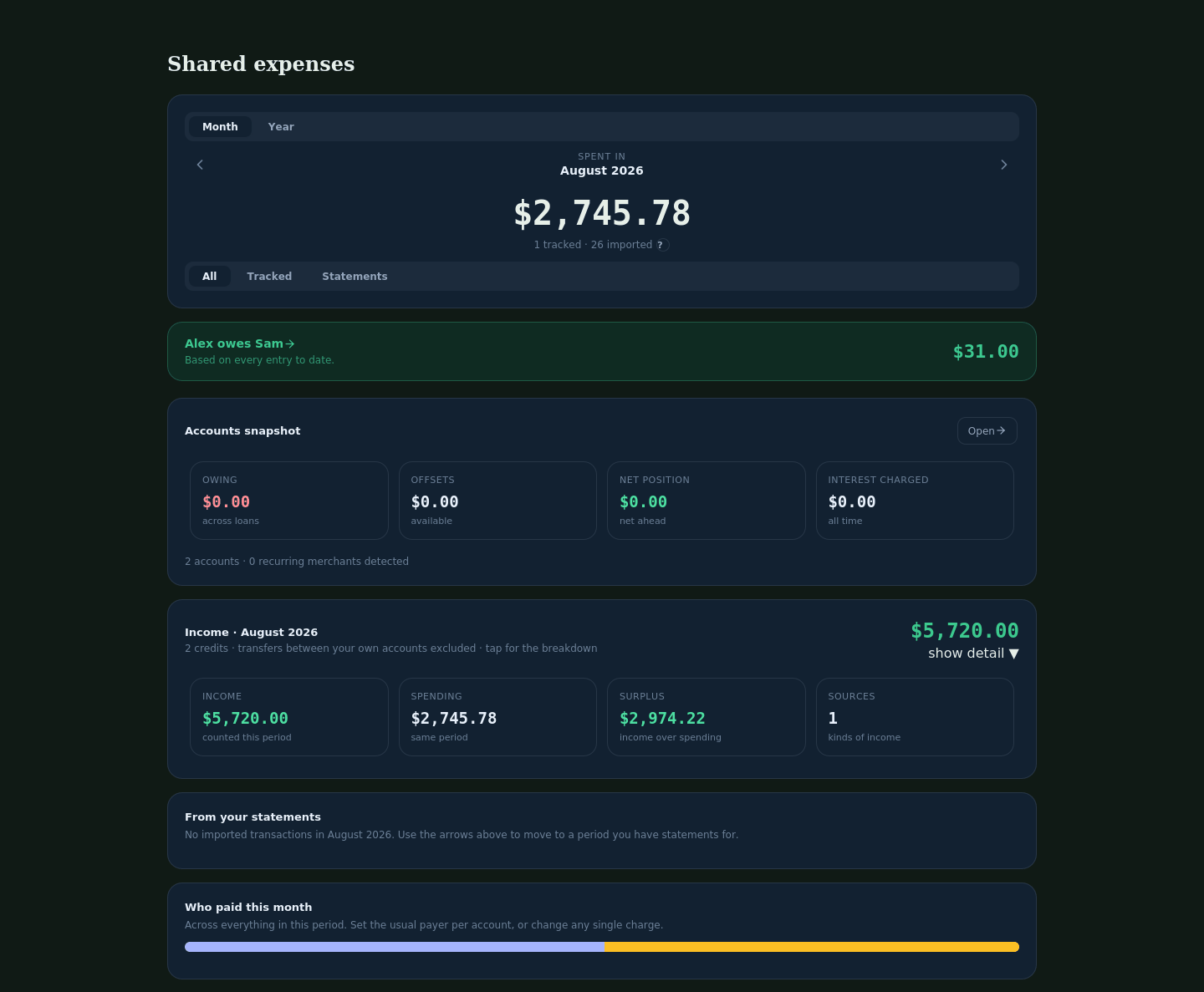
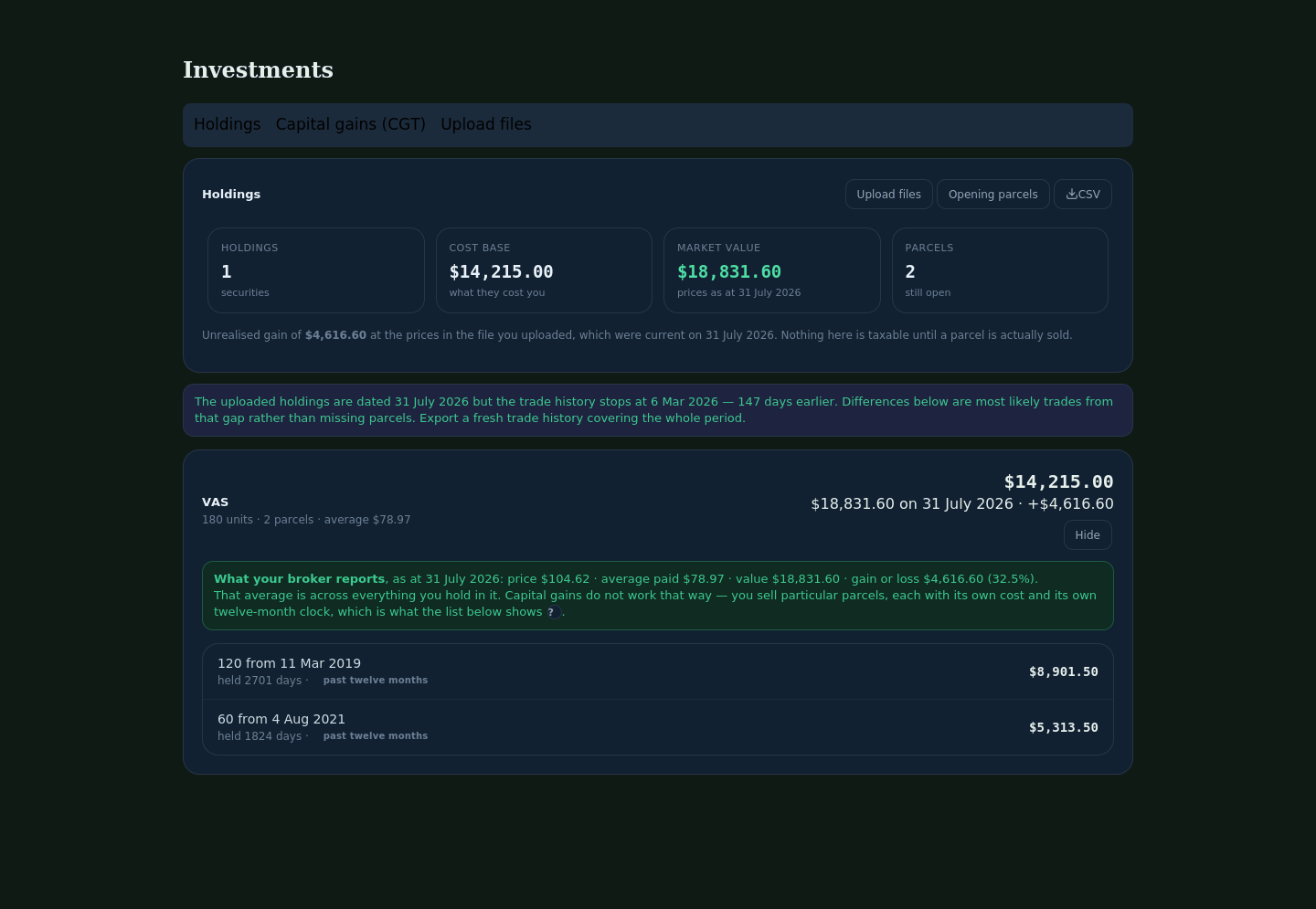
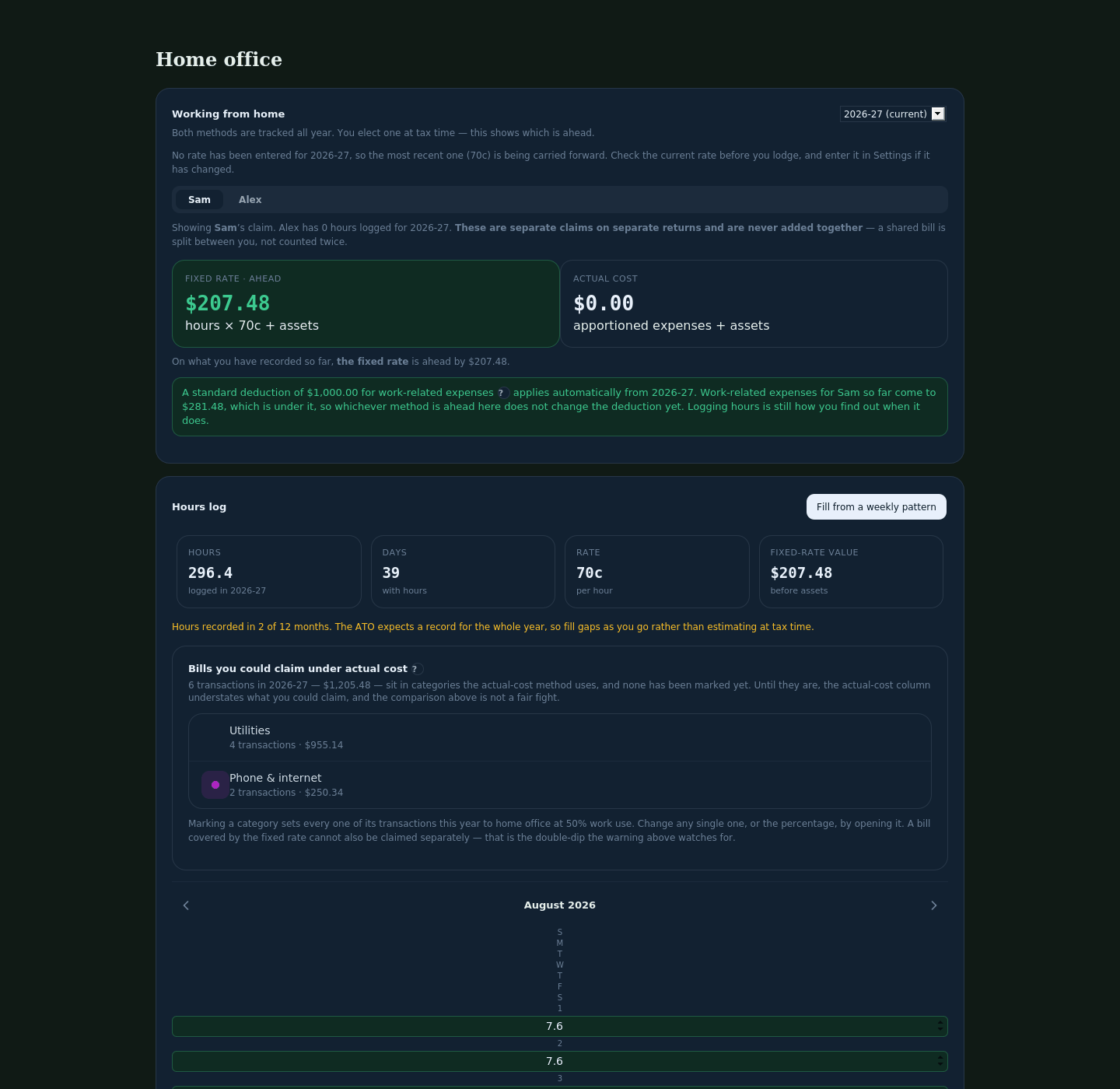
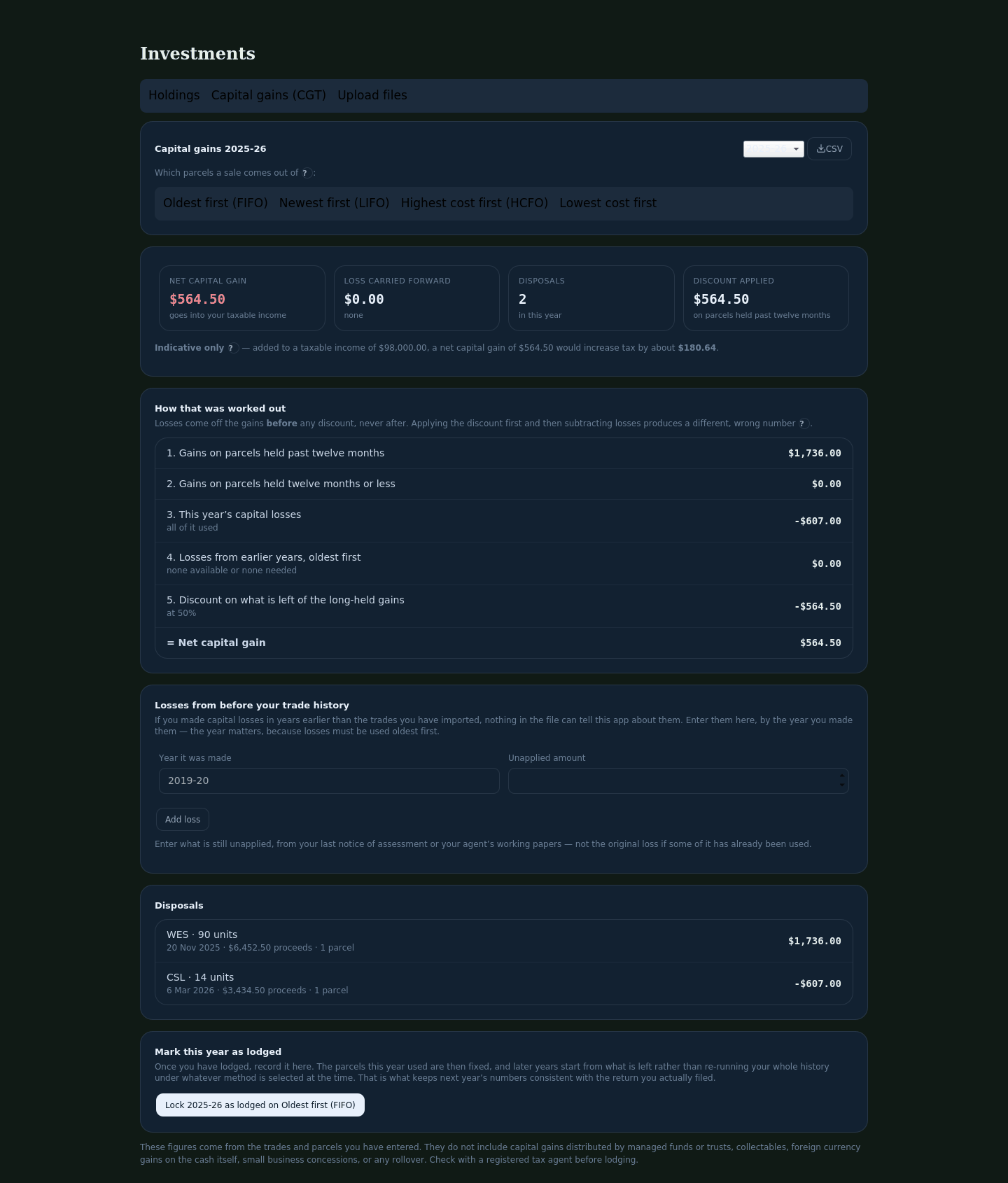
Screens from the current build, shown in the dark theme. The figures are invented — a made-up household called Sam and Alex. Yours never leave your computer, so we have never seen anybody's.
Setting a budget usually means guessing, being wrong, and giving up. Track Yeah! already knows what you spend, so it offers a starting figure and lets you argue with it.
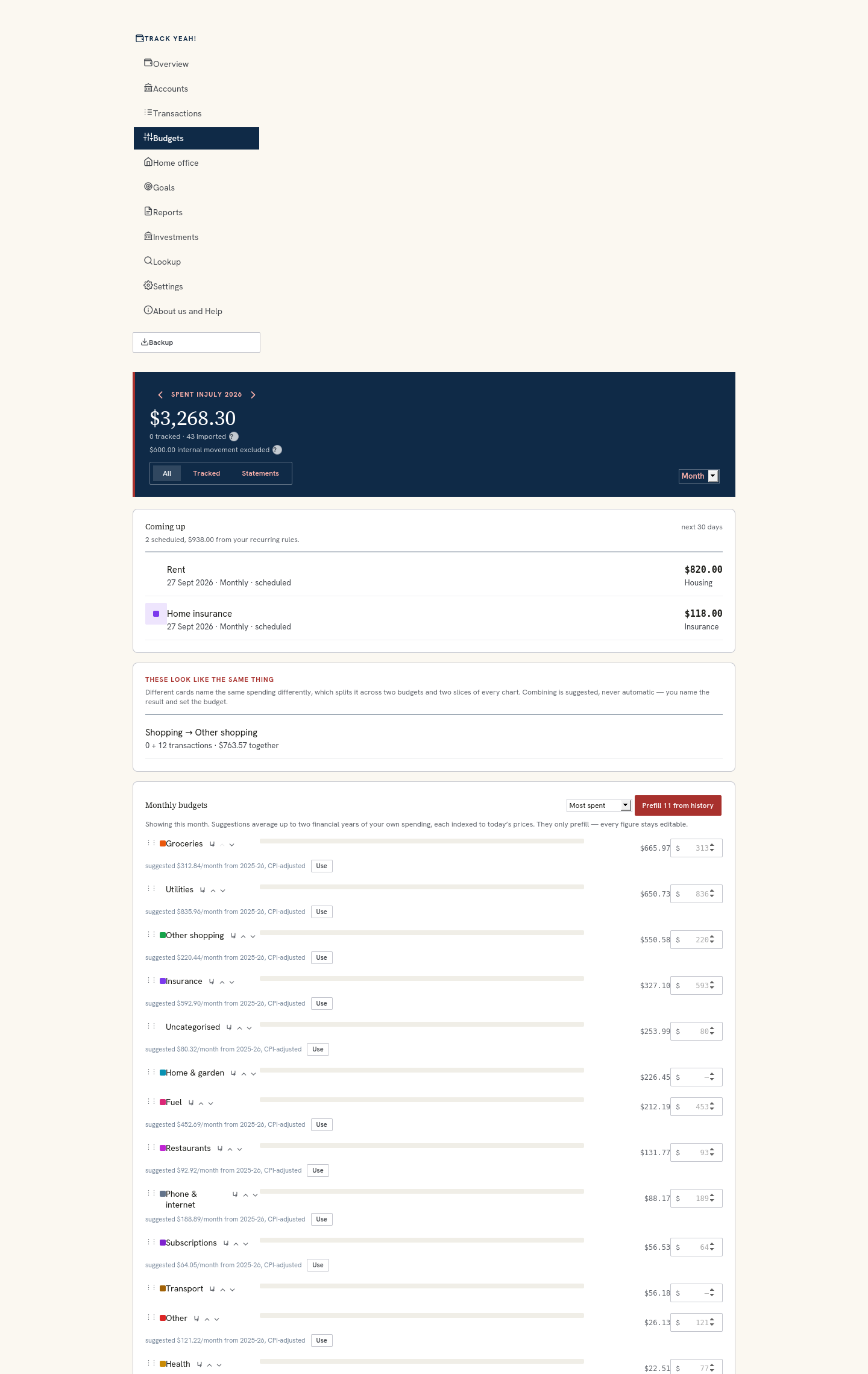
It uses what you actually spent in that category, from the statements you imported. No benchmark, no comparison to anyone else, and nobody else's data anywhere near it.
One year can be a fluke — a car repair, a quiet winter. Two evens it out. If you have only been using it a few months, it offers fewer suggestions rather than pretending to know.
A category first seen in March is not divided by twelve. Doing that would nearly halve the suggestion and quietly set you up to blow the budget every month.
A dollar two years ago bought more than a dollar today, so each year is indexed for inflation before averaging. Skip that and every suggestion is a little too low — the failure you would never notice, because it looks like restraint.
Interest follows your balance and the cash rate, not the price of groceries. Indexing it would be arithmetic applied where it does not belong, so it is left alone.
Press Use to take it, or type over it. Nothing is set for you, and the working is on the screen — which years it drew on, and that it was adjusted — so you can disagree with it for a reason.
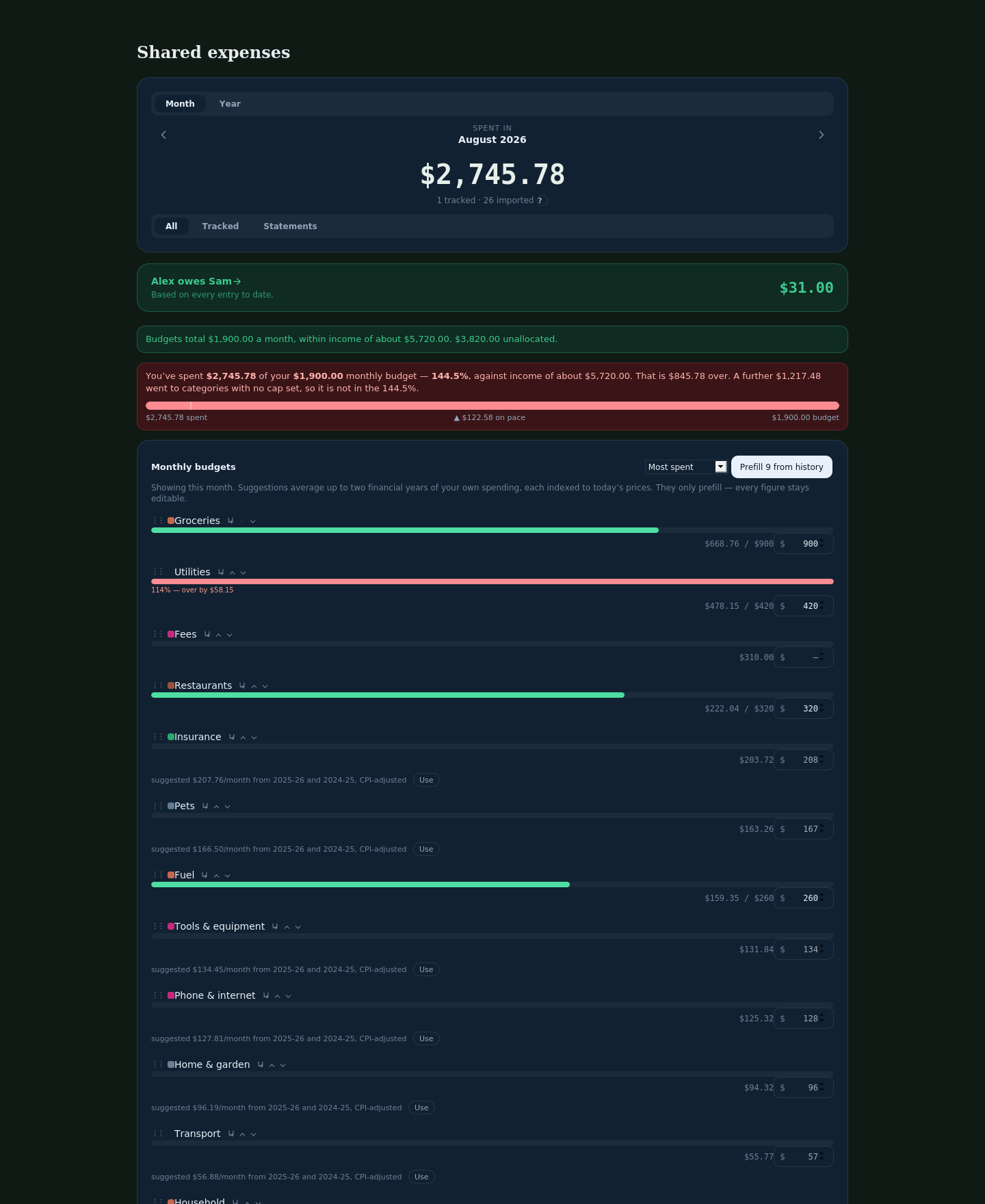
Comparing a part-month total against a whole-month cap makes every early month look healthy and every late one look like a disaster. It reports both, so you can tell spending fast apart from simply being near the end.
Money spent in categories you have not budgeted is real, but it cannot sit inside a percentage of caps that do not exist. It is reported alongside with its own figure, rather than folded in or dropped.
Where it extrapolates from the pace so far it says so in those words — an estimate, not a forecast — and only once enough of the month has passed for the estimate to mean anything.
It also checks the caps against your income. If they add up to more than comes in, it says so before the month starts rather than after.
Worth knowing before you download it, rather than after.
It isn't tax advice, and it doesn't lodge anything. It does arithmetic on what you enter and shows its working. Check anything that matters with a registered tax agent.
It won't connect to your bank. There's no feed and no open banking. You export a CSV yourself. That's the cost of the promise above, and we think it's worth paying.
Australian tax rules only, for now. Other countries are on the list; the rules are already separated from the rest so they can be added without disturbing anything else.
Two people, one household. It isn't accounting software and doesn't try to be.
Spreadsheets need saving as CSV first. There's no spreadsheet reader inside, which is part of how it stays a single file that works with nothing installed.
If you forget your PIN, the data is gone. Nobody holds a copy and there's no reset. Back up before you set one — the app tells you the same thing.
Free while we're testing. Download it, open it, and put a month of statements through it — nothing you do can reach us, so tell us how it went.
Unzip it and double-click trackyeah.html. That's the whole installation, on Windows, macOS or Linux.
The download also carries a sample statement, so you can try it without using your own.
Optional, Windows only: a small installer that gives Track Yeah! a browser window of its own, separate from your everyday browsing and with extensions switched off. Windows will warn you before running it, because it is not code-signed — we would rather tell you that than pretend otherwise. You do not need it to use the app.
Beta means we're still finding things. Nothing is uploaded when something goes wrong, so if you hit a problem, email contact@applepiesolutions.com.au — there's a diagnostics export inside the app that describes the shape of the problem without carrying a single merchant name, amount or account number.
Release log
Every version, what went into it, and when. Track Yeah! is in beta and moving — this is how you tell whether it is still being worked on.
0.9.9
August 2026
A new tab for a rental you own. It reads what you have already tagged — an account marked Investment, rows tagged as rental expenses — and offers to set the property up with the account linked and the date rent started already filled in. You can dismiss a suggestion it gets wrong, and change anything it fills in.
What it is really for: a capital item bought after your depreciation schedule was drawn up — solar, a hot water system, air conditioning — is invisible to that schedule, so it is often never claimed at all. Record the date the schedule was prepared and the screen tells you which items post-date it. That list is the one your accountant does not have.
It applies published rates to what you tell it. Whether an item is plant, capital works or a repair is a call for your registered tax agent, and it does not pretend otherwise: an item missing its method or effective life shows nothing rather than a confident wrong number.
Worth re-checking any account you imported from a file with two money columns. If your bank splits money out and money in across two columns, the app previously picked one of them, rejected every row on the other side, and read the remaining rows with the bank's sign — so purchases could import as income. Both columns are now read together, and the preview on the mapping screen runs exactly the same arithmetic the import does, so what you see there is what you get.
Where a file has a single Amount column, it now asks whether spending is shown as a positive or a negative in that file, and says so if most rows look the wrong way round. Amounts written as (45.00) or with a dollar sign now import instead of being rejected.
Telling the app that a charge is interest changed the figure in the loan modeller but not on the Overview card, and loan principal still counted the credits. One answer now, everywhere — the same fix as 0.9.8, finished.
The home-office equipment table was wider than the space it had, so the claim figure and the delete button were clipped at every window size. Retracked to fit, with a check that fails the build if any table outgrows its column again.
Account pickers show the account's name rather than its internal id, and list every account you have imported rather than only the ones you had tagged. A mortgage and its offset can be linked to a property separately. A single transaction missing its account name could take down the whole Accounts screen; it cannot now.
0.9.8
August 2026
Open Accounts and press Model extra payments on anything you owe money on. The amount owing and your repayment are offered from your own statements; drag the sliders to see what an extra repayment or a one-off saves in interest and how much sooner the loan is paid off. Every assumption is written on the screen.
If you raise the rate far enough that the repayment no longer covers the interest, it says so plainly rather than showing an impossible payoff date. And it checks itself against the interest your statements actually show, so you can see whether the projection has anything solid behind it. It reports arithmetic about the loan you have — it does not compare lenders or suggest refinancing.
Some lenders write “INT CHRG” where others write “INTEREST CHARGED”. Open any charge on a loan or card and set what kind of charge it is — for that row, or for every transaction from that merchant.
Worth doing if your Accounts screen has ever shown an interest figure that looked wrong. This was previously worked out two different ways that could disagree: one counted a “rate change notice” fee as interest, the other missed abbreviations entirely.
Choosing a three-day week left the app still using five. Two people now have their own weekly pattern instead of one shared one that whoever saved last overwrote. And the screen opens on whoever has the hours, rather than always on the other person's blank screen.
Adding an item is a table now rather than a run of pop-up questions. The new column is whose it is — yours, your partner's, or shared with a percentage. Set a desk to shared at 60/40 and each of you sees your own share at your own cost, with the full price beside it so a smaller figure never reads as the wrong amount typed in.
Card repayments worded “PAYMENT RECEIVED — THANK YOU” are recognised as money moved between your own accounts; before, the paying side counted and the card side did not, so the two could never reconcile. Typing in the loan modeller no longer jumps the cursor back to the first field. Adding equipment while the screen sat on an earlier financial year filed it correctly but showed nothing; it now moves to the year the item belongs to.
0.9.7
August 2026
The Budgets screen was repeating work once per transaction that it only needed to do once. On a two-year ledger it opens in about half the time, and returning to it is close to instant.
A credit your bank filed under a name like “Transfers in” was counted on one screen and silently dropped on another — so Overview could show no income while Transactions showed several credits. They are now listed in the income breakdown with a line saying why they are not in the total, and Settings tells you how to change that if they really are income.
The look is data now rather than something baked into the code. Nothing visible changes, but a firm could put its own identity on this without touching the logic. The palette that ships is Apple Pie Solutions’ own, matching this site.
The four figures above the transaction list match the band above them exactly. The period band aligns with the menu beside it. Home deposit goals are worded as such.
0.9.6
August 2026
With a PIN set but not yet entered, saving wrote an empty state over the encrypted data instead of leaving it alone — so home-office hours, goals and whole ledgers could disappear, and a backup taken afterwards contained nothing. Nothing is written now until the PIN has been entered.
One Save backup button, named with the date and time it was taken. Choose a backup folder and it writes straight into it; leave it unset and it downloads as before.
If the app cannot open — usually because another window still has it open — it says so and offers a way forward. The About screen now shows the build date.
0.9.5
August 2026
Recurring rules moved under Budgets, beside what is about to be charged. One transaction list instead of two.
The twelve-month test for the 50% CGT discount counted days rather than comparing dates, so an asset held exactly twelve months across a leap day was treated as eligible. Now calendar-based.
A transaction tagged as rental, work-related or home office says so in the list, with the percentage and person where they apply.
0.9.4
August 2026
Budgets shows the next thirty days — scheduled items from your own rules, and separately, spending regular enough to predict. Predictions say what they rest on, and you can tell one it is wrong.
Set a target and a date. Link it to a real account and it measures; leave it unlinked and it tracks the plan and says so. The first-home template lists the costs people are caught out by.
0.9.3
August 2026
Statements in .xlsx now import, including workbooks with one account per tab. QIF too, for banks that offer nothing else.
The $1,000 work-related standard deduction is compared against your actual claim, per person, for the years it applies to.
0.9.2
August 2026
Parcel-level tracking with the arithmetic shown step by step, including corporate actions.
An optional PIN encrypts everything stored, using a key that never leaves this computer.
Dates are the month a version was built. Versions before 0.9.2 were not released outside testing.